Agent Keys
One per session
A session takes a key the first time it does something, in the Claude app or in a terminal. A tap clears green or red and shows that session. Hold a key to forget its session.
UnofficialmacOS 14+Open source
Six keys follow six Claude Code sessions and light by what each one is doing. Tap a key to open its session. Approve, decline and answer question cards without reaching for the mouse.
Free, MIT licensed. Not affiliated with OpenAI, Work Louder or Anthropic.
01 / Lights
The colors are yours to change, with the brightness and the pulse, in the window or the config file.
02 / Controls
Agent Keys
A session takes a key the first time it does something, in the Claude app or in a terminal. A tap clears green or red and shows that session. Hold a key to forget its session.
Yes, No
Press the session’s next-step button: “Allow once”, “Deny”, or a question card’s Next, Submit or Skip. In a terminal: Return or Esc.
Dial
Turn to move between answers, press to tick or submit. Elsewhere it is Up, Down and Return. Hold it to open the config file.
Stick
Permission mode, previous and next session, the sidebar. Up and down can scroll what is under the pointer, and left and right move the pointer between panes.
Fast, Fork, Send
Fast types /fast. Fork types /branch or starts a new chat. Send sends the message.
Mic
The wide key is push to talk.
Six keys, more sessions
The six most urgent sessions hold the keys: needs you first, then done or failed, then working, then idle. The session on screen keeps its key.
Pins and memory
Pin a session and it keeps its key, however urgent the others are. A session that ended keeps its key, and a tap opens it again. Keys survive a restart.
Every control can be rebound to any of 49 named commands, a key combination, typed text, a shell command or something to open, on press, release, double tap or hold. All of them.
03 / The window
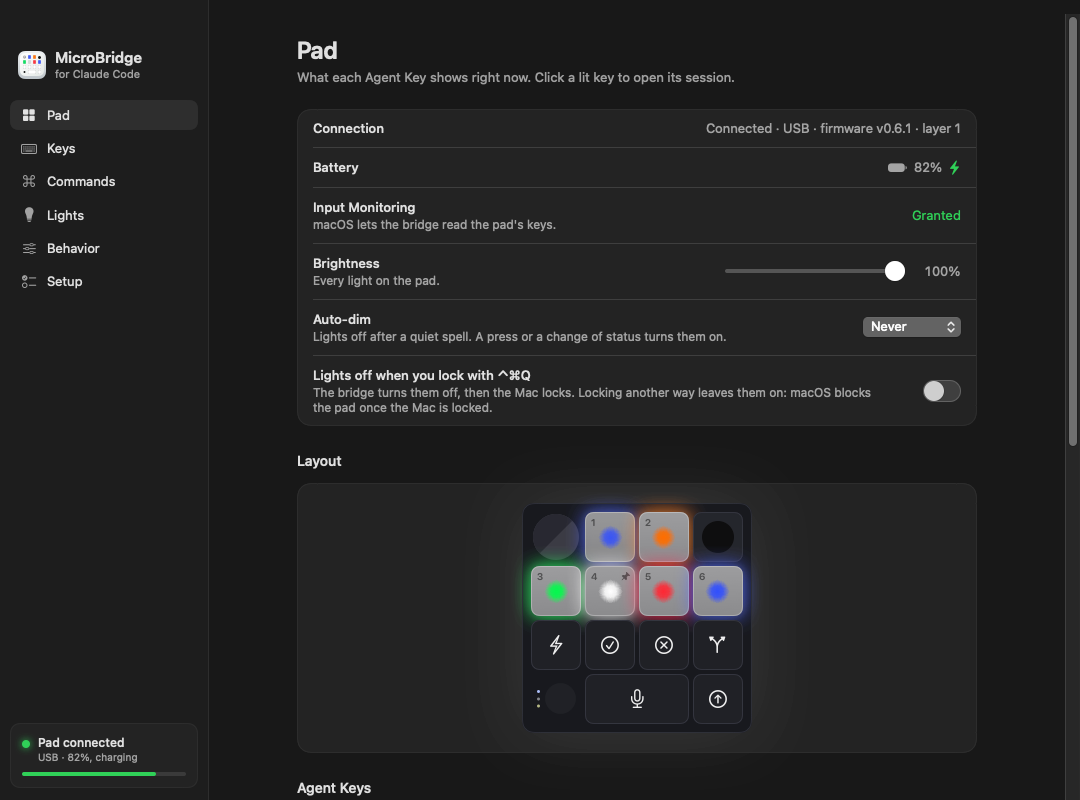
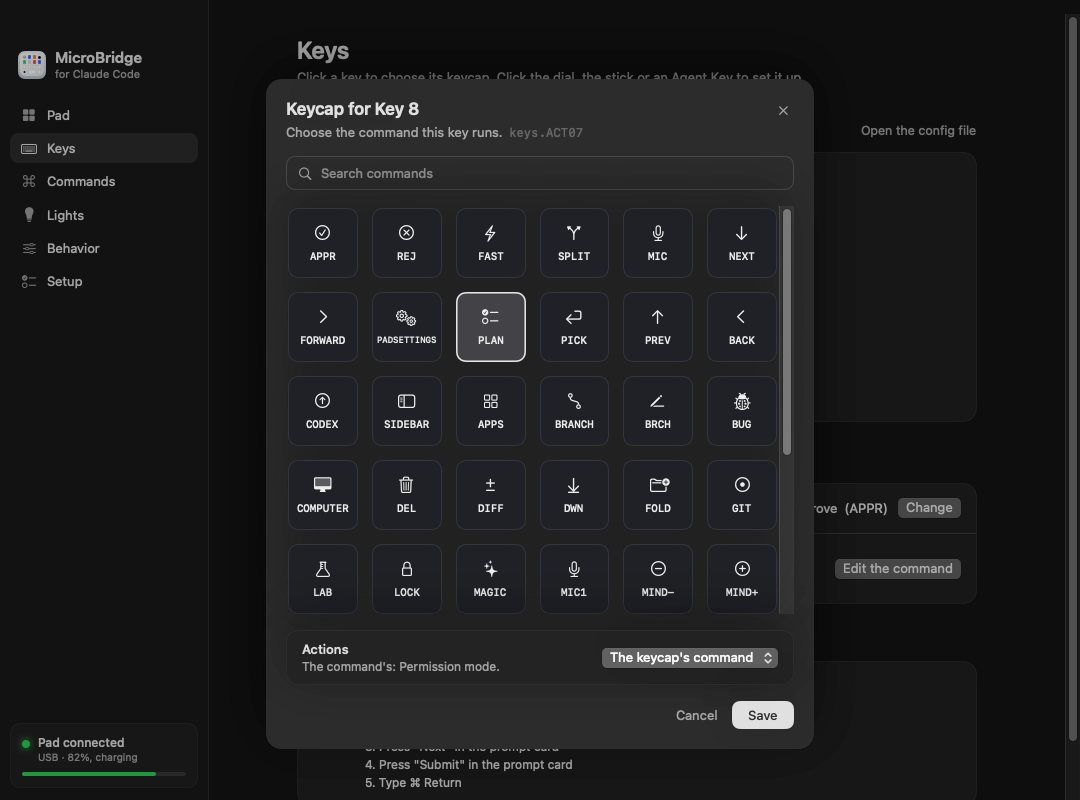
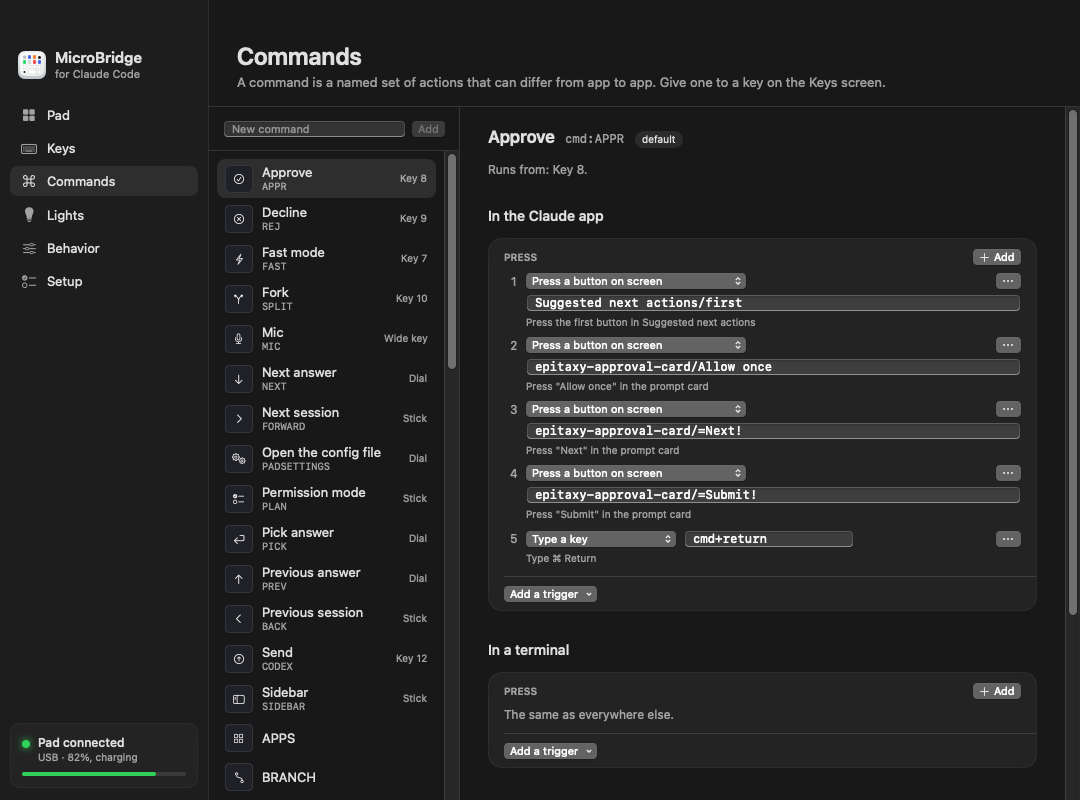
Six screens: Pad, Keys, Commands, Lights, Behavior and Setup. The window writes the same config file you can edit by hand, and the bridge picks a change up within a second.
04 / ChatGPT
The Codex Micro ships working with ChatGPT and Codex, and MicroBridge shares it rather than taking it over. Taps on the pad’s touch sensor, its bottom-left edge, pass the pad to ChatGPT and back.
05 / How it works
Runs a hook on each event: a prompt, a tool call, a permission request, the end of a turn.
Gives each session a key and a light. Turns a press into a key typed or a button pressed in the app in front.
Shows the lights. Sends its keys, dial and stick back.
Swift, no third-party code at run time. The hook reports and exits without printing anything, so tool calls are not slowed down. The design and its dated build log are in the repo.
06 / Install
Get the code.
You need macOS 14 or later and Swift 6: Xcode 16, or just the Command Line Tools.git clone https://github.com/Philopateer2099/micro-bridge.git && cd micro-bridgeMake a signing identity, once.
Optional. A local certificate, so macOS keeps the Input Monitoring grant when you rebuild.scripts/make-certBuild and install.
MicroBridge.app goes to ~/Applications and starts at login.scripts/installTell Claude Code to report to it.
Adds one hook to ~/.claude/settings.json. It backs the file up first, or creates it if there is none.scripts/claude-hooks installGive it access.
Shows Input Monitoring and Accessibility, and asks for what is missing.scripts/micro accessOpen the window.
Its Setup screen checks each step and says what is still missing.open ~/Applications/MicroBridge.app Prefer a plugin? In a Claude Code session, run
/plugin install micro-bridge --marketplace Philopateer2099/micro-bridge instead of step 4. Use one or
the other.
Pad still dark? Restart the bridge:
launchctl kickstart -k "gui/$(id -u)/local.micro-bridge". The log is
~/Library/Logs/micro-bridge.log.
Removing it takes two commands: the README has them.
07 / Config
Hold the dial to open the file. Save it, and the pad follows within a second. A broken file is ignored and the last good settings stay.
A key can type text, send a key combination, press a button on screen, run a shell command or open a link. The same key can do one thing in the Claude app and another in a terminal.
"keys": {
  "ACT06": "cmd:NEW",
  "ACT09": ["sh:git stash", "text:stashed\n"],
  "ACT12": { "press": "key:return", "hold": "key:escape" }
},
"lighting": { "colors": { "working": "#304FFE" } }
08 / Safety
09 / Questions
No. MicroBridge is an independent, open source project. None of them made, endorsed or support it. You need your own Codex Micro.
Yes. Taps on the pad’s touch sensor pass it to ChatGPT and back: two taps out of the box, one tap with a two-layer profile. After a tap, ChatGPT can take up to 10 seconds to pick the pad up.
No. It is built for macOS 14 or later, and it presses buttons in the Claude app through the macOS Accessibility API.
Untested. It was built and tested with the pad on USB.
No. The bridge makes no network connections. Claude Code’s hook and the bridge talk over a local Unix socket.
Not yet. Build it from source with the six commands above. A signed download needs an Apple Developer ID, and it is planned.
The bridge finds the Claude app’s buttons by their accessibility labels, so an update can rename one. The config file lets you point a key at the new name before a release does.
They get a key and a light too. A tap brings the terminal forward, not the exact tab.